What is an EPOS system? A guide to faster, smarter business payments
What is an EPOS system? A guide to faster, smarter business payments

30 December 2025 | Published by Jodie Wilkinson
Cast your mind back to those clunky tills that needed everything typed in manually. Staff frantically punching in prices whilst customers queued out the door, hoping they'd keyed in the right amount before hitting total.
Thankfully, those chaotic days are behind us. Electronic point of sale (EPOS) systems have completely transformed how small businesses operate, turning what used to be a stressful transaction into a smooth, seamless experience for both you and your customers.
Learn more about EPOS and how they can transform your business with our guide.
What is an EPOS system?
EPOS stands for 'electronic point of sale', and refers to a computerised till system that combines hardware and software to process transactions and manage your business operations. Unlike traditional tills that simply ring up sales, EPOS systems are intelligent tools that connect all aspects of your business.
Here's what most EPOS systems can do for your business:
- Accepting cash, cards, contactless, and mobile wallets
- Tracking inventory levels automatically in real-time
- Generate insights into your business performance
- Store customer data and purchase history
- Manage staff rotas
- Coordinate operations across multiple sites
In simple terms, using an EPOS system is the modern way to run your business. When a customer buys something, your EPOS handles the payment, updates your inventory, records the sale, and prints a receipt – all automatically, with no manual input required.
What’s the difference between EPOS vs POS systems?
You'll often hear the terms EPOS and POS used interchangeably, and whilst they're similar, there are some key differences worth knowing about.
A point-of-sale (POS) is essentially an umbrella term for any method or setup that lets you accept face-to-face payments. This could be anything from a traditional mechanical till to modern electronic hardware; it's not tied to one specific type of system.
EPOS systems, on the other hand, are more advanced. They're electronic POS setups that connect to the cloud and store all your data online. This means you can access your business information remotely from any internet-enabled device, and because everything's backed up to central servers, your data is more secure with less risk of losing important information.
| Traditional POS systems | Modern EPOS systems |
|
Simple transaction processing Works offline Lower initial cost Local data storage only No remote access Limited reporting Doesn't integrate with other tools |
Advanced transaction processing Cloud-based data storage Access from anywhere Detailed reporting and analytics Integrates with accounting and e-commerce Automatic updates Requires an internet connection |
Think of it this way: all EPOS systems are POS systems, but not all POS systems are EPOS.
EPOS takes the basic point-of-sale concept and adds layers of digital technology, connectivity, and capabilities that traditional POS systems simply can't match.
EPOS system components
Every EPOS system combines specific hardware and software elements to create a complete business solution. Here are some of the most common components:
Hardware
The physical components of your EPOS system tend to include:
- Computer or tablet – This is your central control hub, usually featuring a touchscreen interface that allows staff to easily navigate through the system and input information.
- Barcode scanner or RFID reader – These devices quickly and accurately identify products by reading their barcodes, so you don’t need to enter the price manually.
- Cash drawer – Just like traditional tills, this securely stores any cash received from transactions and opens automatically when needed.
- Receipt printer – A compact device that uses thermal paper to create physical receipts for customers, providing them with proof of purchase.
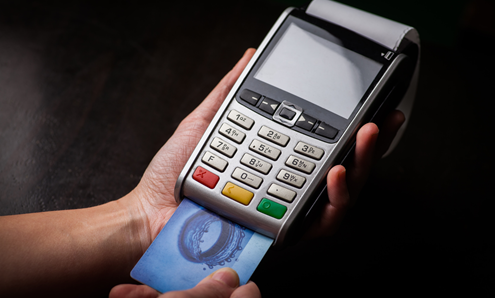
- Card machine – Integrated payment terminals that handle chip and PIN, contactless, and mobile wallet payments like Apple Pay, transferring money directly to your merchant account.
Software
The software that powers all of the hardware:
- Transaction processing and data – Handles the complete sales process, from product scanning to payment completion and receipt generation. Also keeps track of details like what items are sold, how many, their prices, and timestamps.
- Inventory management – Tracks stock levels in real-time, automatically updating quantities as items are sold and alerting you when products are running low.
- Reporting and analytics – Generates detailed insights into your sales performance, customer behaviour, and business trends to help you make informed decisions.
- Customer data – Stores customer details, purchase history, and loyalty programme information to help you build stronger relationships.
- Staff permissions and data – Allows you to set different access levels for employees, ensuring security and accountability across your team. You may also be able to manage and schedule rotas.
- Integration capabilities – Connects seamlessly with accounting software, online stores, and other business tools to create a unified system.
How does an EPOS work?
At its heart, an EPOS system works a lot like a traditional till: it processes a payment and keeps a record of the transaction. But that's where the similarities end.
Here's exactly what happens when a customer makes a purchase:
- Staff scan the item's barcode (or enter it onto the touchscreen).
- The system automatically pulls up the correct price and product details.
- The EPOS calculates the total, including any applicable taxes or discounts.
- The customer pays using the integrated card machine, cash, or contactless methods.
- The payment processes and receipt prints automatically.
- Stock levels update in real-time across all systems.
- The sale gets logged in your reports and analytics.
- The customer data is captured if they're part of your loyalty scheme.
- All information syncs instantly to the cloud.
But here's where EPOS systems really shine: everything from step 5 onwards usually happens automatically in the background, without any manual input from your staff.
Because EPOS systems are connected to the internet, all your data flows seamlessly between different parts of your business. Your inventory management talks to your sales reporting, which connects to your customer database, which links to your accounting software. It creates one unified system that gives you complete visibility of your operations, without you having to do anything after the transaction has been completed.
This integration means you can check your sales figures from your mobile phone, update product prices from your laptop at home, or generate end-of-day reports with a few clicks.
Types of EPOS systems
Not all EPOS systems are the same; there are several different types designed to match how and where your business operates. Choosing the right one depends on whether you need maximum portability, heavy-duty performance, or something in between.
All-in-one EPOS
All-in-one systems pack everything you need into a single, sturdy unit that's built to handle whatever you throw at it.
These are your go-to choice if you run a busy retail store, restaurant, or any business where your till stays put and works hard all day long. They're designed for high transaction volumes and come loaded with every feature you could need. Think comprehensive reporting, advanced inventory tracking, and robust customer management tools.
At takepayments, our tPOS complete system features all the hardware and software your business needs to carry out everyday processes, delivering enterprise-level functionality in a user-friendly package that grows with your business.
Mobile EPOS
For businesses that aren’t fixed to a single location, mobile EPOS systems turn your smartphone into a powerful payment terminal. Simply pair it with a card reader and you're ready to trade anywhere.
These systems are game-changers for market traders, delivery drivers, pop-up shops, or anyone who needs to bring the checkout to the customer.
Tablet EPOS
Tablet systems offer the perfect balance between portability and power. They're robust enough to withstand busy periods but light enough to carry around when needed.
They’re perfect for hospitality businesses that want to take orders at tables, retail stores that need flexibility during stocktakes, or companies that operate both indoors and outdoors. The larger screen makes complex transactions easier while maintaining the mobility smaller businesses love.
Advantages of EPOS for small businesses
More and more small businesses are switching to EPOS systems, and once you see what they can do, it's easy to understand why.
Here are the key benefits that could transform how you operate:
1. Reduces queue abandonment and lost sales
Customer patience at checkout is thinner than you might think. Research found that shoppers will only put up with six minutes of payment disruption before getting frustrated, and they’ll wait up to 22 minutes before abandoning their purchase altogether.
Even worse, 86% of UK consumers avoid stores completely if they think the queue is too long.
EPOS systems with integrated payments process transactions in seconds. No manual typing means no delays, keeping queues moving and customers happy. When transactions that used to take minutes now take seconds, you'll serve more customers and protect your revenue.
2. Lower the chances of human mistakes
Getting the price wrong damages both your profits and your reputation. When staff manually enter amounts, mistakes are inevitable, whether it's a decimal point in the wrong place or typing £15 instead of £50.
With EPOS, the moment an item is scanned, the correct price automatically transfers to your payment terminal. No human input means no human error. Your customers get charged accurately every time, and you avoid the awkward conversations (and potential chargebacks) that come with pricing mistakes.
3. Prevents staff theft
New data released by insurer Zurich UK in June 2025 reveals that 4,562 employee theft offences were reported in England and Wales, with each incident costing businesses up to £35,728. And that's just what got reported to the police; the reality is that many cases go undetected or unreported by businesses.
EPOS systems can help to combat this by creating automatic audit trails that show exactly who processed what transaction, when, and for how much. With some models, staff can't manually adjust prices or apply unauthorised discounts without it being recorded. This transparency can deter theft and make investigation simpler if issues do happen.
4. Reclaim hours lost to admin
End-of-day reconciliation used to mean manually matching card machine reports with till records. Or, in other words: a tedious process that could take an hour or more, especially if the numbers didn't add up.
Thankfully, most integrated EPOS systems do this automatically. Everything syncs in real-time, so your reports are ready instantly. That's time you can spend on actually growing your business instead of being buried in paperwork.
5. Get accurate insights, instantly
When your till and card machine operate separately, inaccurate reporting becomes a constant headache. One small error in either system throws your entire accounting off, leading to hours of detective work.
Cloud-based EPOS systems give you one single source of truth. All transactions across all locations and devices feed into unified reports you can access from anywhere. You can check your sales from your phone at home, update pricing from your laptop, or review stock levels while meeting with suppliers.
6. Accept every payment method customers want
Our latest research into UK consumers’ favourite ways to pay revealed that contactless transactions remain a firm favourite, but a number of shoppers also prefer cash, mobile wallets, or even chip and PIN.
With a variety of methods being used today, if your business can't accept the payment options customers expect, you could be turning away sales.
Modern EPOS systems accept everything as standard: cash, all major cards, contactless, Apple Pay, Google Pay, and more.
Even the over-55s are embracing contactless, with 62% now preferring the technology over mobile wallets and even cash.
7. Protect customer data professionally
A single data breach can destroy years of carefully built trust. Customers expect their payment information to be handled securely, and data protection regulations demand it. In fact, one of the main goals of the latest PCI DSS regulations is to standardise how businesses store, process, and transmit cardholder details to protect their customers’ data.
EPOS systems come with built-in security features including encrypted card processing, secure cloud storage, and automatic security updates. You get enterprise-grade protection without needing to be a cybersecurity expert.
How to choose the right EPOS for your small business
With so many EPOS systems on the market, finding the right one for your business can feel overwhelming. Here's what you need to consider to make the best choice:
Your business needs
Start by thinking about how you actually operate. Do you trade from a fixed location, or do you need portability for markets and events? How many transactions do you process daily? What payment methods do your customers expect?
A busy restaurant needs different features from a mobile hair stylist or a boutique retailer. Be honest about your requirements now and where you expect to be in two years — you want a system that can grow with you.
Budget
Price matters, but the cheapest isn't always best. Look beyond the headline monthly cost to understand what you're actually getting. Dig into the details of the contract to find out if it includes customer support, if the software updates are free, and whether you’re covered if the equipment breaks.
Factor in the total cost of ownership. For example, some providers charge extra for every little add-on, while others bundle everything together. Hidden fees can quickly turn an affordable system into an expensive one.
Support and training
The fanciest system in the world is useless if there's no one to call when things go wrong.
Look for providers offering comprehensive onboarding, one-to-one training, and responsive customer support. Can you reach someone quickly when you need help, and is support available during trading hours? These details matter when you've got customers waiting.
Integration capabilities
Your EPOS shouldn't exist in isolation. The best systems integrate seamlessly with your accounting software, online store, booking systems, and other business tools you already use.
Ask potential providers which integrations they support. Having everything connected saves time, reduces errors, and gives you better visibility across your entire operation.
Ease of use
If your staff can't use the system quickly and confidently, it'll slow you down rather than speed you up. Look for intuitive interfaces with clear navigation. Ideally, try before you buy.
The best EPOS systems are designed so new staff can learn the basics in minutes, not days. Complicated systems lead to mistakes, frustrated employees, and slower service.
Take control of your business with takepayments
EPOS systems have transformed from basic tills into powerful business tools that streamline operations, reduce errors, and provide valuable insights – all whilst keeping your customers happy. Whether you run a fixed location or trade on the move, the right EPOS system can make your business more efficient and profitable from day one.
Ready to see how EPOS can work for your business? Contact our friendly team of experts today, or learn more about our tPOS systems here.